Updated: 19 November 2026


WinWinter App for iPhone and iPad: Install and Play
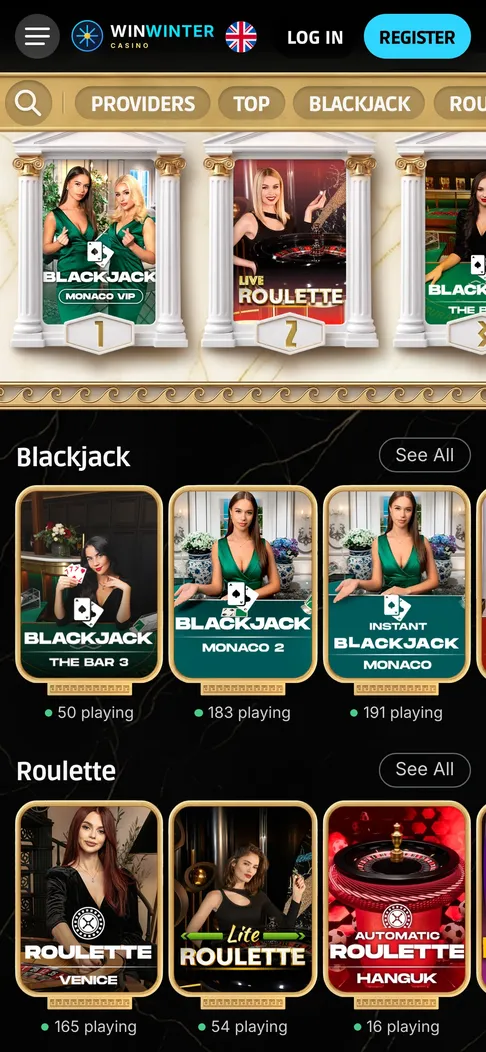
WinWinter in Safari on iPhone: the live casino lobby on a phone screen.
WinWinter iOS app at a glance
Playing on an iPhone or iPad relies on a mobile browser configuration rather than a downloadable app from the App Store. The winwinter app ios experience is delivered through a progressive web setup that loads directly inside Safari on Apple devices without requiring any manual file downloads or installations. The platform runs smoothly across modern mobile hardware, adapting its layout to fit smaller screens while keeping touch controls responsive for slots, table games and live dealer streams.
| Feature | Specification | Detail |
|---|---|---|
| Operating System | iOS 15 or newer recommended | Ensures compatibility with modern web graphics and security protocols |
| Browser | Safari | Default browser optimized for home screen shortcuts and full-screen display |
| Download Size | 0 MB | No storage space consumed on the device memory |
| Supported Devices | iPhone and iPad | Scales automatically to tablet and smartphone displays |
| Payment Methods | Apple Pay, Visa, Mastercard, Skrill, Revolut, Crypto | Instant deposits and withdrawals processed within up to 3 business days |
The underlying technology ensures that 3,000+ games from 150+ providers load without lag when connected to a stable 4G or 5G mobile network. Popular software studios like Pragmatic Play, NetEnt, Play’n GO, Playtech and Evolution supply the catalogue, covering everything from classic fruit machines to complex megaways setups and live casino tables. Players can switch between the casino and sportsbook sections using the same account balance, making mobile navigation straightforward. The system stores login credentials securely within the browser cookie storage if permitted by the user, speeding up subsequent visits to the platform.
Transactions on iOS devices benefit from native integration with Apple Pay, allowing deposits from £15 upwards to be authorized via Face ID or Touch ID in seconds. Other accepted payment methods include standard bank cards, e-wallets like Skrill, Revolut and cryptocurrencies such as BTC, ETH, USDT and LTC. A mandatory turnover rule requires any deposited funds to be wagered 3x before a withdrawal request can be processed. Withdrawals take up to 3 business days to clear depending on the chosen payment method, with e-wallets and crypto options typically clearing faster after approval.
Account registration is split into a simple two-step procedure designed for mobile screens. Step one requires an email address and a secure password, while step two collects necessary personal details to comply with identity verification requirements. KYC checks are mandatory before any substantial cashouts are approved, requiring standard documentation to confirm identity and residential address. Customer support is accessible 24/7 through live chat and email directly inside the mobile interface if any verification or payment questions arise during use.
WinWinter iPhone install step by step
There is no App Store download, so the WinWinter iPhone app is a Safari shortcut. It takes under a minute to set up, uses no storage and updates itself every time the casino changes its site. iPad users follow exactly the same route, and the layout switches to the wider tablet view automatically. The steps below cover the whole process, from the first visit to the first deposit.
Accessing the platform on iOS
Finding a dedicated application in the App Store will yield no results because the casino does not distribute a native client through Apple’s marketplace. Users must open their preferred mobile browser, specifically Safari, and enter the web address manually to reach the mobile-optimized portal. This approach ensures that players always access the latest version of the site without needing manual software updates.
Creating a home screen shortcut
- Open Safari on your iPhone or iPad and navigate to the main web portal.
- Tap the Share icon located at the bottom toolbar of the Safari browser window.
- Scroll down the options list and select Add to Home Screen.
- Rename the shortcut if desired and tap Add in the top right corner.
- Locate the newly created WinWinter icon on your device home screen and tap it to launch the platform in full-screen mode.
Logging in and claiming offers
Once the shortcut is pinned to the home screen, tapping it opens the casino interface without the browser address bar visible, mimicking a standalone application. Existing users can log in using their email and password, while new players can complete the two-step registration form. During the first deposit of £40 or more, players can select the welcome package in the cashier, offering a 100% match up to £600 plus 50 free spins. Further details on wagering requirements and alternative promotions can be found via the WinWinter bonus overview page.
WinWinter iOS app problems
Most iPhone problems have nothing to do with the casino itself. They come from Safari settings, an old iOS version or a shortcut that was saved the wrong way. Each fix below takes a minute or two. If none of them helps, the 24/7 live chat inside the casino can check whether the issue sits on the account side, for example a pending verification.
Browser cache and loading issues
Sometimes the web app may fail to load new game additions or show a blank screen due to corrupted browser cache data. Clearing Safari cache data or opening a private browsing tab usually resolves rendering bugs instantly. Ensuring the device runs iOS 15 or newer prevents compatibility errors with modern HTML5 slot titles from providers like Pragmatic Play and Evolution.
Shortcut opening in browser tabs
If the home screen shortcut opens standard browser tabs instead of the immersive full-screen view, the shortcut may have been created incorrectly. Deleting the icon from the home screen and repeating the Safari share sheet process fixes this display behavior. Network stability drops can also interrupt live dealer streams, so switching from a weak Wi-Fi signal to a stable mobile data connection often restores stream quality.
Login and payment friction
Password reset requests must be handled directly through the login form if credentials are forgotten, as customer support cannot manually retrieve lost passwords for security reasons. Payment authorization errors when using Apple Pay usually stem from insufficient funds or card restrictions set by the issuing bank. Ensuring the deposit meets the £15 minimum limit prevents transaction rejections at the cashier stage.
If gambling stops being fun, the National Gambling Helpline run by GamCare (0808 8020 133, free and open 24/7) and BeGambleAware offer confidential support.
WinWinter iOS app FAQ
Can I download the WinWinter app from the Apple App Store on my iPhone?
There is no native app available in the App Store for iOS devices. Instead, you can open the casino directly in the Safari mobile browser on your iPhone or iPad and play over 3,000 games instantly.
How do I add a shortcut to WinWinter on my iPhone home screen?
Open Safari on your device, navigate to the casino website, tap the Share button in the browser menu, and select Add to Home Screen. This creates a quick-launch icon that opens the site in full-screen mode just like a downloaded app.
Do I need a separate account to play on my iPhone compared to a desktop computer?
You use the same single account and wallet across all devices, meaning your balance, active bonuses, and sports bets sync automatically. Registration takes just a couple of minutes through the mobile browser using a two-step form.