Updated: 19 November 2026


WinWinter App for Android: Download and Install
WinWinter in Chrome on Android: the slot lobby, saved to the home screen as a shortcut.
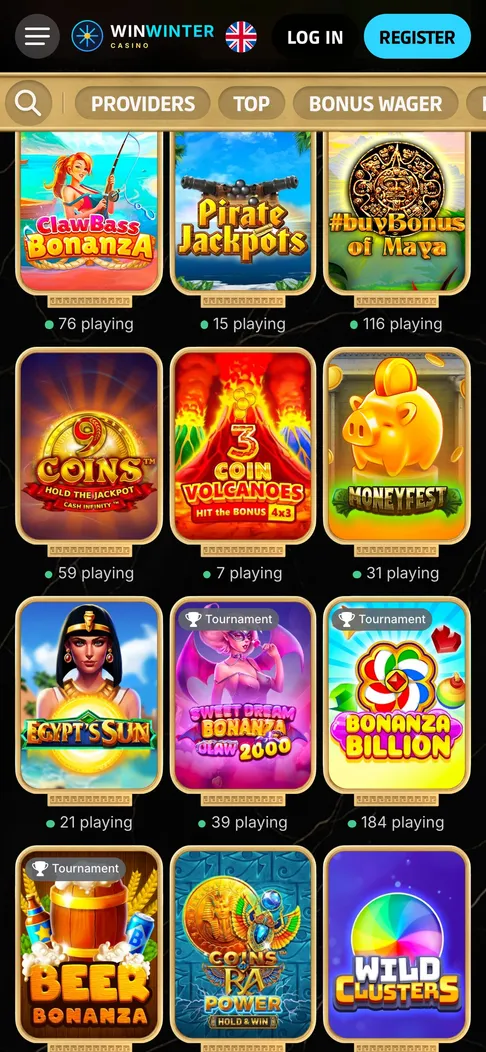
WinWinter Android app at a glance
Many players search for a native WinWinter app for Android, but the operator does not provide a downloadable APK or an installation file through the Google Play store. Instead, the casino offers a fully responsive web interface that functions through any modern mobile browser. By creating a shortcut to the website on your home screen, you essentially simulate the experience of a dedicated application without needing to install external software files or grant excessive system permissions to your device. This method saves storage space and ensures you are always accessing the most current version of the platform directly from the server.
| Feature | Requirement | Specification |
|---|---|---|
| Operating System | Android 8.0 or newer | Required for stable performance |
| Browser | Google Chrome (recommended) | Any modern mobile browser works |
| Storage Space | Less than 1 MB | Only the shortcut placeholder |
| Internet Connection | Stable 4G, 5G, or Wi-Fi | Recommended for live casino stability |
| System Permissions | None required | No access to contacts or location |
| Interface Type | Progressive Web App | Browser-based mobile site |
Using this shortcut approach provides access to the full catalog of over 3,000 games. This includes high-volatility slots, Megaways titles, and classic table games. Because the site is optimized for touch interaction, navigation through the various categories is simple. You can manage your account, process deposits via Visa, Mastercard, Skrill, Revolut, Apple Pay, or cryptocurrencies like BTC, ETH, USDT, and LTC, and monitor your bonus progress without needing to visit the desktop site. The system uses the same security protocols as a banking app to protect your personal data, and the browser environment handles the encryption requirements for every transaction you initiate.
Since the platform operates as a web-based service, it removes the need for frequent manual updates. Whenever the development team releases new features, such as additional payment options or an updated lobby design, these changes appear automatically the next time you open the shortcut. This is particularly useful for players who rely on live casino streaming, as the underlying browser engine is typically better optimized for video playback than a static application. The interface remains consistent across different device manufacturers, including Samsung, Xiaomi, and Google Pixel models, ensuring that your gameplay experience is identical regardless of the hardware you use.
WinWinter Android install step by step
To begin using the WinWinter mobile interface on your Android device, you must start by opening your primary web browser. Chrome is the standard choice for most users, but the site also runs on Firefox, Opera, and Microsoft Edge. Once you have navigated to the casino home page, take a moment to log in if you already have an account. If you are new to the platform, the registration process takes place in two steps. First, provide your email and create a password. Second, input your personal details as requested by the site to complete your profile, which is necessary to meet KYC verification standards later.
Follow these specific steps to pin the site to your home screen for quick access:
- Open your mobile browser and enter the web address of the casino to load the main lobby.
- Locate the menu button in the browser. In Chrome, this is represented by three vertical dots found in the top-right or bottom-right corner of the screen.
- Scroll through the menu options until you find the choice labeled “Add to Home screen” or “Install app”.
- A pop-up dialog will appear asking you to confirm the name of the shortcut. You can accept the default label or edit it to something recognizable like “WinWinter”.
- Tap the “Add” button. Your device will automatically place a shortcut icon on your home screen among your other apps.
Once the icon is placed, you can tap it at any time to launch the casino. This shortcut bypasses the need to type the address manually or browse through your bookmarks. While you perform these steps, keep in mind that the casino shares its wallet between the sportsbook and the slots lobby. If you prefer playing on other devices, you might want to consider the WinWinter app for iPhone if you ever switch your primary phone. The functionality remains identical, as the site adapts to your screen size regardless of the operating system. Ensure that your browser cache is cleared occasionally if you encounter minor loading delays, as this helps the site load assets like game thumbnails and balance information faster.
When depositing for the first time, remember that the welcome package is divided across three deposits. The first deposit grants a 100% bonus up to €600 plus 50 free spins. The second offers a 55% bonus up to €600 with another 50 free spins. The third deposit provides a 100% bonus up to €600. To qualify, you must deposit at least €40. Note that the wagering requirement is 35x, and while you have an active bonus, the maximum stake allowed is €4 per spin. If you prefer high-roller options, you can choose a 50% bonus up to €600 on a single deposit of €450 or more. No promo code is required for these offers; simply select the desired bonus in the cashier section during your deposit process.
WinWinter Android app problems
Performance issues often stem from browser settings rather than the casino platform itself. If the site fails to load or remains stuck on a loading screen, the first step is to check your internet stability. Live dealer games from providers like Evolution require a steady connection to prevent drops during a hand of blackjack or a round of roulette. If you are using a mobile data connection, moving to a stable Wi-Fi network usually resolves connection-related errors. If the issue persists, try closing other background apps that might be consuming bandwidth, such as video streaming services or large downloads, as these can impact the delivery of high-definition game graphics.
Another common difficulty involves login failures. If you find yourself unable to access your account, check the password reset tool in the login form. The site requires a password that you should keep confidential and store securely. Do not share your login credentials with anyone, as the site uses stringent security measures. If you are prompted for identity verification, you must be ready to provide the necessary documentation. Verification is a standard part of the process, and although the time taken can vary, it is typically completed within 24 to 48 hours. Ensure your uploaded images are clear and show all four corners of your documents to avoid unnecessary delays in the approval process.
Regarding game-specific performance, popular titles like Big Bass Bonanza offer an RTP of 96.71% with high volatility and a 2,100x max win potential, but keep in mind that the RTP can differ between casino versions. Similarly, Gates of Olympus features an RTP of 96.50% with very high volatility, a 5,000x max win, and multipliers up to 500x. If a slot fails to launch, it is often due to an outdated browser version. Updating your Chrome browser to the latest version via the store usually fixes rendering errors. Also, ensure your system clock is set to automatic, as incorrect time settings on your phone can cause security certificates to fail validation, preventing the browser from opening the site entirely.
Should you encounter errors during a deposit or withdrawal, verify that you are meeting the minimum requirements. For general play, the minimum deposit and withdrawal limit is €15. However, as previously mentioned, the welcome bonus requires a minimum deposit of €40. A deposit must be turned over at least 3x before a withdrawal request can be processed. If you attempt a withdrawal before meeting this turnover requirement, the request will be declined. Processing times for withdrawals usually take up to 3 business days once the request is approved. While e-wallet and crypto withdrawals are typically faster, often reaching your account within 24 hours of approval, bank cards like Visa and Mastercard may take the full three-day duration due to interbank processing cycles. If you have concerns about a transaction, the 24/7 live chat is the best way to contact support staff who can view your account status in real-time.
WinWinter Android app FAQ
Does playing on the mobile version change the welcome bonus or wagering requirements?
No, the welcome package remains consistent across all devices, including the mobile browser version. You can claim up to €1,800 across your first three deposits, all of which are subject to a 35x wagering requirement. Ensure your qualifying deposit is at least €40 and keep your stakes at or below €4 while working toward the bonus conditions.
Is it safe to manage my finances through the mobile browser site?
The mobile site provides the same level of security for transactions as the desktop version, allowing you to use Visa, Mastercard, Revolut, Apple Pay, Skrill, or cryptocurrencies like BTC and ETH. You can deposit and withdraw starting from €15, though keep in mind that all deposits must be wagered 3x before a withdrawal can be requested. Always utilize the account tools to set deposit limits, and remember that gaming is for individuals 18 and older.
What should I do if I cannot log in to my account on my Android device?
If you experience login issues, verify that your mobile browser is up to date and that you have a stable internet connection. You can reset your password directly via the login form, and if issues persist, you can contact the 24/7 live chat or email support for assistance. If you are experiencing difficulties with gambling, please reach out to free national support services in your country for guidance.